Product update
One inbox for incoming business documents
Bring invoices and receipts into one review path with source traceability, extraction suggestions and duplicate awareness.
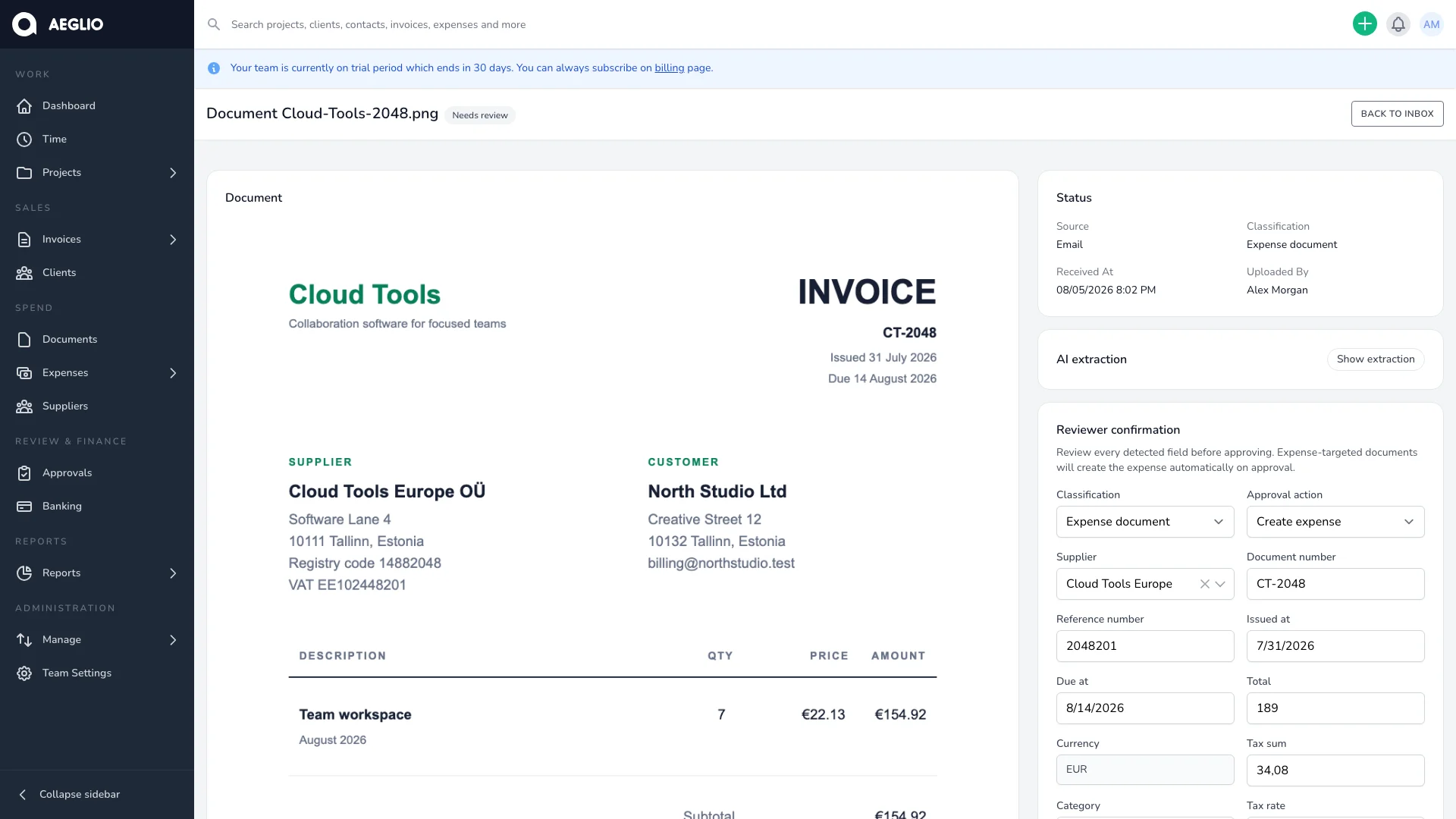
Business documents rarely arrive through one predictable channel. A supplier sends an invoice by email. An employee photographs a receipt. Another document appears in a shared cloud folder or arrives as an e-invoice.
Aeglio brings those supported sources into one document inbox. Finance can review the original file, extraction suggestions, coding context and approval state without rebuilding the trail from separate tools.
Capture first, decide later
A document can enter Aeglio through desktop upload, mobile-friendly capture, a dedicated email address or a connected document source such as OneDrive or Dropbox. Supported received e-invoices can join the same review path through Billberry.
Each document retains its source and available source metadata. Connected folder imports separate processed and unsupported files, while the inbox shows whether a document is waiting, being reviewed, confirmed, converted or needs attention.
Employees can submit receipts through the focused capture flow without receiving broad access to the finance inbox. The simple act of providing evidence remains separate from the authority to code, approve or convert it.
Let extraction prepare the first draft
AI-assisted extraction can propose useful fields from the document, including:
- Supplier and document identifiers.
- Issue and due dates.
- Totals, tax details and currency.
- Payment references and available bank details.
- Category, project and other relevant coding context.
Aeglio-managed extraction uses Mistral's EU regional endpoint. A team owner can instead connect a supported provider for the team. When authoritative structured data is available from a supported e-invoice, Aeglio uses that source instead of asking AI to reinterpret it.
Extraction status remains visible while processing is pending, complete or unable to use a particular file type. If AI assistance is unavailable or inconclusive, the document still remains in the review workflow rather than disappearing behind a failed automation step.
Keep the suggestion separate from the decision
Extracted values are a draft. They do not silently create an expense, select the final supplier or approve financial coding.
The review screen keeps the original document beside the proposed values. A reviewer can correct dates, amounts, supplier, category, project, tax treatment, payment hints and the person who incurred the expense. An uncertain expense owner can be cleared instead of accepting an automated guess.
Aeglio preserves the extraction snapshot separately from the confirmed review data. This makes it possible to understand what was suggested and what a person ultimately decided.
Resolve possible duplicates before conversion
Repeated documents create repeated work and can become repeated financial records. Aeglio flags likely duplicates before conversion and requires the reviewer to resolve the warning.
The reviewer can confirm that the document is a duplicate or dismiss the warning when the records are legitimately different. A confirmed duplicate cannot be converted into a new expense.
This keeps duplicate detection as a decision aid rather than an invisible deletion rule. The original document and the review outcome remain available for traceability.
Route the document to the right reviewer
After the document data is checked, Aeglio can resolve the matching approval workflow from the available context. Review, approval, coding, final approval and delegation can remain separate responsibilities.
The person submitting evidence does not need company-wide financial access. Assigned reviewers see the document and decision context they need, while protected coding and conversion actions remain with authorized roles.
Approval history records the people and actions involved. If a correction or another review step is required, the document stays connected to that process instead of moving into an external message thread.
Convert without losing the source
Once review requirements are complete, an authorized user can convert the document into its intended expense record. The original file, confirmed values, source trace and review decisions remain connected to the resulting record.
That connection matters later. The expense can continue through approval, project costing, accounting handoff, payment and bank reconciliation without losing the document that started the workflow.
One queue for the work that needs judgment
The document inbox does not try to make every financial decision automatically. It gathers supported sources, prepares a useful first draft and makes uncertainty visible so reviewers can focus on the documents that need judgment.
Explore the complete expense document workflow or review the available document intake integrations.